
What's New

2017.10.06 - Beta 1 Update 2 (0.3.2)
- Add support for system DPI scaling.
- Add touch gesture support for tablet.
- Add "Show file icon/extension" option for real folder menu.
- Add "Remove/Reset plug-in" option in plug-in configuration panel.
- Add "Delay startup" option in general configuration panel.
- Add plug-in disabling hints when trying to remove a widget.
- [ GGO Widget ][ HP-Bar ]Separate "Lock widget" and "Transparent widget" option.
- [ Web Browser Engine ]Add support for Node-CEF.
- Remove "Disable action filters" option.
- Fix failed to open some files in real folder menu.
- Fix launcher overlapped by task-bar.
- Fix launcher cannot display wallpaper in some aspect ratios.
- Fix cannot scroll launcher menu by mouse under some circumstances.
- [ Mail Box ]Fix cannot remove friends.
- [ Mail Box ]Fix some system cannot connect to servers via SSL.
- [ Web Browser Engine ]Fix some pop-ups such as combo box menu does not display.
- [ Bangumi ]Fix configuration dialog covered by information panel.
- Some UI and functional adjustment.
Features
What is SAO Utils?
The SAO Utils program is a Sword Art Online Look'n'Feel launcher with varieties of powerful utilities.
Its pluggable architecture allows you, the developer, to add any kinds of plug-ins to the core program.
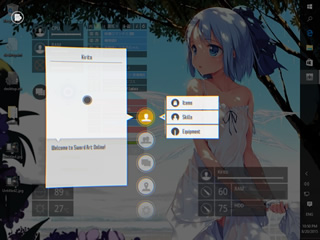
Slide to Launch
Anywhere and whenever,
holds mouse LMB and RMB,
or holds two fingers on tablet,
slide down to call out the launcher.

Arrange as You like
Right Click any items to edit.
Drag the button to arrange any items.
You can also d'n'd files from the File Explorer.
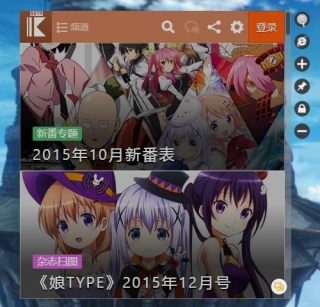
Desktop Widgets
Decorate desktop with your favorite
images, web pages, animation, notes...
also varieties system and custom status.
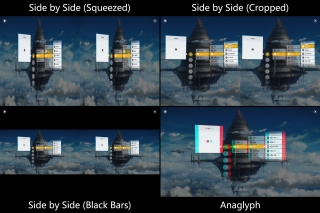
VR Ready
Built-in stereo supports for launcher:
Side by Side (Squeezed)
Side by Side (Cropped)
Side by Side (Black Bars)
Anaglyph
Browse web pages and images with VR.
Highlights
Development Platform

NERvSDK SAO Utils Plug-in Development Kit
Please clone the NERvSDK repository on GitHub to get the latest C++ SDK, more development materials:
- Plug-in development tutorial: NERvSDK Wiki
- Online API reference: NERvDN Library
- Collaborative development repository: NERvHub

Keep Staring!
We might add supports for C or C# in the future.
As soon as the SDK becoming stable, we may try to wrap it and release SDKs for other languages such as Java, JS, and Python.
Resources
Plug-ins
| Name | Version | Links | ||
|---|---|---|---|---|
Usage
Click Preference - Plug-ins - Install... button to install the *.NVG package.
Themes


Usage
Please refer to 舰娘魔改主题-帮助文档.
Language Packages
| Language | Version | File Name | Source |
|---|---|---|---|
| New Translation Template | v0.10 | sao_utils_beta1_pot.zip | |
Usage
Unzip package to the root folder of SAO Utils.
Other Resources
| Description | Link |
|---|
Online Chat (IRC)
FAQ
- DO NOT run
SAO Utils.exein the ZIP package directly, please extract the package before running. - DO NOT extract the package to the system folder, or if you have to do so, please make sure that read and write permissions are granted to the
SAO Utilsfolder as well as its sub folders.
- Right Click any items you want to add an item next to.
- Right Click the
Modifybutton just popped-up. - Click the
+button in the editing tray.
- Right Click any items you want to add a sub-menu.
- Click the
Modifybutton just popped-up. -
In the item setting panel, Click the
Sub-Menucheck box, now you can choose the menu types:Virtual Folderenables you to organize custom menu items.Real Folderenables you to manage the files inside a folder.
- In the item setting panel, Click the
Actioncheck box andURLradio box. -
Click the
...button then input one of the strings:- Computer:
file://::{20D04FE0-3AEA-1069-A2D8-08002B30309D} - Libraries:
file://::{031E4825-7B94-4dc3-B131-E946B44C8DD5} - Documents:
file://::{031E4825-7B94-4dc3-B131-E946B44C8DD5}\Documents.library-ms - Music:
file://::{031E4825-7B94-4dc3-B131-E946B44C8DD5}\Music.library-ms - Pictures:
file://::{031E4825-7B94-4dc3-B131-E946B44C8DD5}\Pictures.library-ms - Videos:
file://::{031E4825-7B94-4dc3-B131-E946B44C8DD5}\Videos.library-ms - Recycle Bin:
file://::{645FF040-5081-101B-9F08-00AA002F954E}
- Computer:
- Shut down:
shutdown.exe -s -t 0 - Reboot:
shutdown.exe -r -t 0 - Lock:
rundll32.exe user32.dll,LockWorkStation - Suspend:
rundll32.exe powrProf.dll,SetSuspendState - Terminal:
cmd - Notepad:
notepad - Calculator:
calc
- The 'Lv' (level) of HP-Bar indicates the up-time of
SAO Utils, so you will lose your previous level once you close it.
- Please refer to SAO Utils VR patch and tutorial.